
By the end of this chapter, you will be able to:
These skills will help you create and maintain efficient networks that keep users connected and businesses running effectively.
Computer networking forms the backbone of modern cyber security operations in Kenya, enabling secure communication, data exchange, and system integration across diverse organizational environments. Understanding the various network types is essential for cyber security professionals to design, implement, and defend appropriate network architectures that meet security and operational requirements. This chapter explores the fundamental terminology related to network types, providing a clear conceptual foundation for identifying and differentiating networks in practical cyber security contexts such as county government offices, universities, and financial institutions. Mastery of these terms equips professionals to assess vulnerabilities and apply targeted security controls effectively.
The concept of "type" in computer networking refers to the classification or categorization of networks based on their scope, architecture, and functionality. For cyber security practitioners in Kenya, accurately identifying network types is critical for tailoring security strategies that address specific threats inherent to each network environment. This section delves into the detailed meaning of network types, clarifying how these categories influence network design and security posture.
In computer networking, a network type defines the structural and operational characteristics that distinguish one network from another. It encompasses aspects such as geographic coverage, ownership, purpose, and technology used. Understanding network types helps cyber security experts to anticipate potential risk areas and implement controls that are contextually appropriate.
Different network types present unique security challenges and opportunities. Cyber security professionals must be familiar with these types to implement effective safeguards tailored to each environment’s needs.
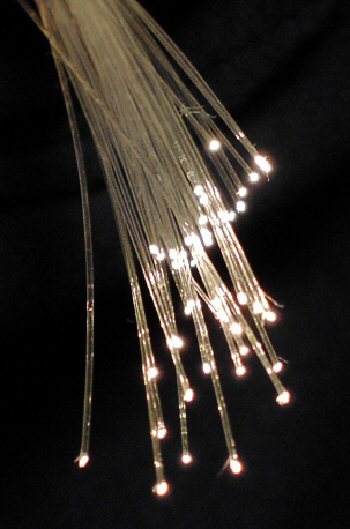
Fiber optic cables used in wide area networks (Source: Wikimedia Commons (Computer network))
Accurate identification of network type is fundamental for assessing threat landscapes, deploying appropriate security controls, and ensuring compliance with Kenyan cyber laws such as the Computer Misuse and Cybercrimes Act.
Cyber security professionals must be able to distinguish network types by analyzing key attributes such as transmission medium-scale, topology, and access methods. This skill is essential for designing secure infrastructures and troubleshooting network-related security incidents.
Explain the term "network type" and discuss five characteristics that define different network types in a Kenyan cyber security context. (10 marks)
Describe five common network types and illustrate how each is used in typical Kenyan institutions. (10 marks)
Why is it critical for cyber security professionals to correctly identify the type of network they are securing? Provide five reasons. (10 marks)
What are five key attributes used to differentiate network types, and how do these attributes influence cyber security strategies? (10 marks)
Create a free account to open more of this chapter.
Free: practical guides, quick cards, workplace scenarios and more.
Create a free accountThis chapter explored the meaning of the term network type, clarifying how different classifications help in understanding the structure and function of computer networks. It examined the essential network components, such as routers, switches, and cables, highlighting their roles in enabling communication between devices. The discussion then moved to network design and architecture, focusing on how these frameworks determine the network's efficiency, scalability, and security. Various types of network topology were described, explaining how the physical and logical arrangement of nodes affects performance and fault tolerance. Each topic built upon the previous to provide a comprehensive understanding of how networks are structured and operate. The concepts covered equip learners with the foundational knowledge necessary for identifying and working with different network types in practical settings.
Type: Individual
| Tools & Equipment | Materials |
|---|---|
| Laptop computer | Network topology diagrams (printed) |
| Projector or Display monitor | |
| Pen and writing pad |
| S/N | Item | Quantity |
|---|---|---|
| 1 | Laptop computer | 1 Pc per Candidate |
| 2 | Projector or Display monitor | 1 Pc per 5 Candidates |
| 3 | Network topology diagrams (printed) | 1 Set per Candidate |
| 4 | Pen and writing pad | 1 Set per Candidate |
| Items to be Evaluated | Marks Available | Marks Obtained | Comments |
|---|---|---|---|
| TASK 1: Define Network Types | |||
| Candidate identifies and defines LAN (Local Area Network) (Award 3 marks for correct and clear definition of LAN) | 3 | ||
| Candidate identifies and defines WAN (Wide Area Network) (Award 3 marks for correct and clear definition of WAN) | 3 | ||
| Candidate identifies and defines MAN (Metropolitan Area Network) (Award 2 marks for correct and clear definition of MAN) | 2 | ||
| Candidate identifies and defines PAN (Personal Area Network) (Award 2 marks for correct and clear definition of PAN) | 2 | ||
| Sub-Total | 10 | ||
| TASK 2: Explain Network Types using Examples | |||
| Candidate explains LAN using example devices such as office computers connected via switch (Award 3 marks for relevant example and explanation of LAN) | 3 | ||
| Candidate explains WAN using example such as internet connection spanning multiple counties (Award 3 marks for relevant example and explanation of WAN) | 3 | ||
| Candidate explains MAN using example such as network linking multiple branches within Nairobi city (Award 2 marks for relevant example and explanation of MAN) | 2 | ||
| Candidate explains PAN using example such as Bluetooth connection between mobile phone and headset (Award 2 marks for relevant example and explanation of PAN) | 2 | ||
| Sub-Total | 10 | ||
| PRODUCT CHECKLIST | |||
| Report contains clear definitions and explanations of all four network types with correct spelling and terminology (Award 5 marks for a well-organized and accurate report covering all network types) | 5 | ||
| Sub-Total | 5 | ||
| GRAND TOTAL | 25 | ||
Type: Individual
| Tools & Equipment | Materials |
|---|---|
| Network cable crimping tool | Router |
| Cable stripper | Switch |
| RJ45 connectors | RJ45 Ethernet cables CAT5e |
| Two desktop computers | |
| Router power adapter | |
| Network switch power adapter |
| S/N | Item | Quantity |
|---|---|---|
| 1 | Router | 1 Pc per Candidate |
| 2 | Switch | 1 Pc per Candidate |
| 3 | RJ45 Ethernet cables CAT5e | 3 Pcs per Candidate |
| 4 | Two desktop computers | 2 Pcs per Candidate |
| 5 | Network cable crimping tool | 1 Pc per Candidate |
| 6 | Cable stripper | 1 Pc per Candidate |
| 7 | RJ45 connectors | 5 Pcs per Candidate |
| 8 | Network switch power adapter | 1 Pc per Candidate |
| 9 | Router power adapter | 1 Pc per Candidate |
| Items to be Evaluated | Marks Available | Marks Obtained | Comments |
|---|---|---|---|
| TASK 1: Identification and assembly of network components | |||
| Wears appropriate PPE (e.g. anti-static wrist strap if available) (Award 1 mark for correct PPE use or zero) | 1 | ||
| Correctly identifies router, switch, and computers (Award 1 mark each for identifying router and switch correctly) | 2 | ||
| Selects appropriate CAT5e cables for connections (Award 1 mark for correct cable selection or zero) | 1 | ||
| Strips cable ends properly without damaging inner wires (Award 2 marks for neat stripping with no wire damage) | 2 | ||
| Arranges cable wires in correct color code for RJ45 termination (TIA/EIA 568B) (Award 2 marks for correct wiring order) | 2 | ||
| Crimps RJ45 connectors securely on cables (Award 2 marks for secure and functional crimping) | 2 | ||
| Connects cables from router to switch and from switch to both computers (Award 1 mark each for each correct connection) | 3 | ||
| Powers on router and switch using correct adapters (Award 1 mark for correct power connection or zero) | 1 | ||
| Assigns IP addresses to computers and verifies connectivity (Award 3 marks for correct IP assignment and successful ping test) | 3 | ||
| Sub-Total | 17 | ||
| PRODUCT CHECKLIST | |||
| Network assembled with correct physical connections and cable terminations (Award 3 marks for complete and neat network assembly matching task instruction) | 3 | ||
| IP addresses assigned to computers within 192.168.0.2 - 192.168.0.3 range with correct subnet mask 255.255.255.0 (Award 3 marks for correct IP addressing and subnet mask) | 3 | ||
| Network connectivity successfully tested with ping between computers and router (Award 3 marks for successful ping test showing full connectivity) | 3 | ||
| Sub-Total | 9 | ||
| GRAND TOTAL | 26 | ||
At the start of this chapter we promised you would be able to:
Tick each one you can genuinely do.
So, are you there yet?
You're competent when you can confidently do 50% or more of what this chapter promised.
Sign in to record how you're doing.