The ability to test computer components effectively is essential for professionals across all sectors in Kenya, from county hospitals to retail businesses. Testing ensures that hardware functions correctly before deployment or after repair, minimizing downtime and enhancing productivity. This chapter focuses on the Power-On Self-Test (POST), a critical diagnostic process that verifies the integrity and functionality of key computer components during startup.
3.1 Performing POST Test on Computer
The POST test is an automated sequence executed by the computer’s firmware immediately after powering on. It checks core hardware components such as memory, processor, and input/output devices, identifying faults before the operating system loads. In Kenyan workplaces like universities and banks, where computer reliability is vital, understanding POST helps technicians quickly isolate hardware issues and reduce service interruptions.
3.1.1 Understanding the Purpose of POST Test
The POST test serves as the computer’s initial health check, confirming that essential hardware is functioning correctly before handing control to the operating system. This step is indispensable in environments such as county government offices and SACCOs, where system failures can delay critical administrative processes.
Purpose of POST Test
- Detect hardware faults early: POST identifies defective components like faulty RAM or missing keyboard connections, preventing further system damage.
- Ensure system stability: By verifying key components, POST reduces the risk of crashes and data loss during operation.
- Provide error reporting: POST uses beep codes or display messages to notify users of specific hardware problems, enabling targeted troubleshooting.
- Facilitate system configuration: POST confirms BIOS settings and hardware configurations are correct, ensuring optimal startup performance.
- Support maintenance routines: Regular POST checks help IT support staff at institutions like Nairobi County Referral Hospital maintain reliable computer operations.
Deepened Purpose of POST Test
- Detect hardware faults early: POST identifies defective components like faulty RAM or missing keyboard connections. For example, at the Kenya Revenue Authority, early detection prevents system downtime that could disrupt tax processing.
- Ensure system stability: By verifying key components, POST reduces the risk of crashes and data loss during operation. In university computer labs, this ensures students can access learning resources without interruption.
- Provide error reporting: POST uses beep codes or display messages to notify users of specific hardware problems. At Nairobi County Referral Hospital, this allows IT staff to quickly diagnose issues affecting patient record systems.
- Facilitate system configuration: POST confirms BIOS settings and hardware configurations are correct, ensuring optimal startup performance. In retail businesses, this helps maintain reliable point-of-sale systems.
- Support maintenance routines: Regular POST checks help IT support staff at institutions like Nairobi County Referral Hospital maintain reliable computer operations. For example, scheduled POST tests can be part of preventive maintenance in county government offices.
3.1.2 Components Tested During POST
POST examines a set of critical hardware elements whose proper function is essential for system startup. These checks are standardized across most computer architectures, making the process universally applicable in diverse workplaces such as hotels and agricultural cooperatives.
Components Tested During POST
- Central Processing Unit (CPU): The processor is checked for proper initialization and communication with other components.
- Random Access Memory (RAM): POST tests memory modules to detect faults that could cause system instability.
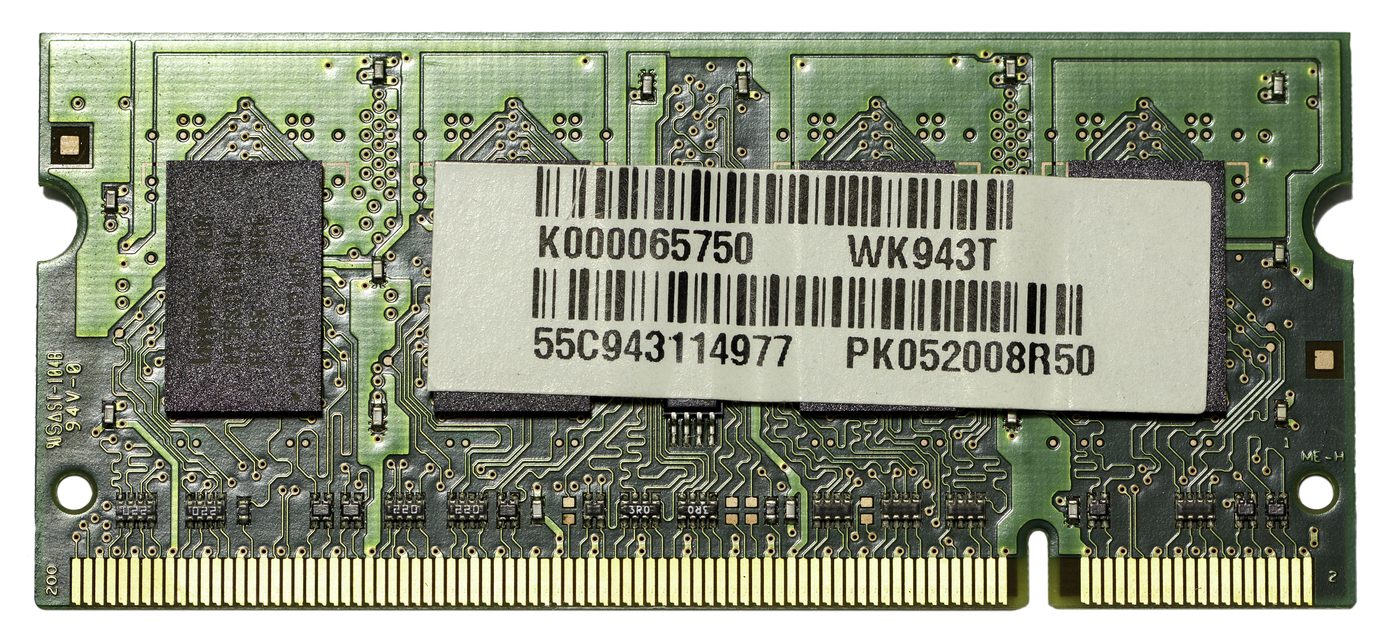
Random Access Memory (RAM) module (Source: Wikimedia Commons)
- Video Adapter: The graphics card or integrated video chipset is verified to ensure display output capability.
- Storage Devices: Basic detection of hard drives or solid-state drives confirms their presence and readiness.
- Input Devices: Keyboard and mouse interfaces are tested to guarantee user input functionality.
Deepened Components Tested During POST
- Central Processing Unit (CPU): The processor is checked for proper initialization and communication with other components. In SACCOs, a faulty CPU can halt financial transaction processing, making this check critical.
- Random Access Memory (RAM): POST tests memory modules to detect faults that could cause system instability. For example, in university examination centers, RAM errors may prevent exam software from running smoothly.
- Video Adapter: The graphics card or integrated video chipset is verified to ensure display output capability. In banking institutions, a failed video adapter can prevent tellers from accessing account information.
- Storage Devices: Basic detection of hard drives or solid-state drives confirms their presence and readiness. In supermarkets, missing or faulty storage devices can disrupt inventory management systems.
- Input Devices: Keyboard and mouse interfaces are tested to guarantee user input functionality. At county government offices, input device failures can delay administrative tasks such as data entry.
3.1.3 Interpreting POST Beep Codes and Error Messages
When POST detects a hardware fault, it communicates the problem through beep codes or error messages displayed on the screen. Familiarity with these signals enables technicians in sectors such as county government offices and retail businesses to diagnose issues without additional diagnostic tools.
Common POST Beep Codes and Their Meanings
- Single short beep: Indicates successful POST with no errors, system ready to boot.
- Continuous beep: Typically signals a memory problem or stuck key on the keyboard.
- One long beep followed by two short beeps: Suggests a video card failure, requiring replacement or reseating.
- Repeated short beeps: Often linked to power supply issues or motherboard faults.
-
No beep with no display: Could indicate CPU failure or a completely dead system board.
-
Single short beep: Indicates successful POST with no errors, system ready to boot. For example, in a SACCO IT department, this means the workstation is ready for daily operations.
- Continuous beep: Typically signals a memory problem or stuck key on the keyboard. In a retail business, this could mean the cashier's computer needs RAM replacement before opening hours.
- One long beep followed by two short beeps: Suggests a video card failure, requiring replacement or reseating. At Nairobi County Referral Hospital, this could affect computers used for patient data entry.
- Repeated short beeps: Often linked to power supply issues or motherboard faults. In a university computer lab, this may require a technician to check the motherboard or PSU before class.
- No beep with no display: Could indicate CPU failure or a completely dead system board. In county government offices, this scenario may prompt escalation to senior IT staff for urgent replacement.
3.1.4 Performing POST Test in Practice
Executing a POST test involves a systematic approach to observe and interpret the computer’s startup behavior. In Kenyan educational institutions, for example, IT support staff follow these steps to ensure computers are ready for daily use.
Steps to Perform POST Test
- Power off the computer and disconnect peripherals: This prevents external devices from interfering with POST diagnostics.
- Power on the computer: Observe the initial startup sequence carefully.
- Listen for beep codes: Pay attention to any audible signals indicating hardware status.
- Watch for error messages on screen: Note any displayed alerts or codes that specify component issues.
- Record observed codes or messages: Documentation assists in troubleshooting and reporting.
- Consult the motherboard manual or manufacturer’s documentation: Match beep codes to specific faults for accurate diagnosis.
Practice Questions
-
Explain the purpose of the POST test in computer maintenance and how it benefits organizations such as banks and hospitals. (10 marks)
-
Identify and describe five critical hardware components tested during the POST process. (10 marks)
-
A computer emits one long beep followed by two short beeps during POST. What does this indicate and what steps should a technician take? (5 marks)
-
Outline the procedure for performing a POST test on a desktop computer in a county government office. (10 marks)
The rest of this chapter
🔒Create a free account to open more of this chapter.
Free: practical guides, quick cards, workplace scenarios and more.
Create a free account 🔒3.2 Evaluation of Test Results
In computer repair and maintenance, evaluating test results is a critical step that determines the next course of action, whether to replace, repair, or optimize components. In Kenyan workplaces such as county referral hospitals or universities, accurate inter…
🔒3.3 Generation of Test Results Report
In the Kenyan professional environment, generating a comprehensive test results report after computer component testing is essential for transparent communication, decision-making, and record-keeping. Whether in a county referral hospital's IT department, a un…
Chapter Summary
This chapter focused on the process of testing computer component functionality, beginning with performing the Power-On Self-Test (POST). The POST is an essential diagnostic procedure carried out when a computer is powered on to verify that hardware components such as memory, storage devices, and input/output interfaces are functioning correctly. Following the POST, the chapter examined how to evaluate test results by interpreting diagnostic codes, beep sequences, and error messages to identify potential hardware failures or configuration issues. Finally, the chapter covered the generation of comprehensive test results reports, which document the findings clearly and systematically to support troubleshooting, maintenance decisions, and communication with clients or technical teams. The ability to perform these steps accurately ensures that computer repairs are based on reliable diagnostic information, improving repair efficiency and computer reliability. Understanding how to analyze and report on test outcomes is crucial for professional computer maintenance and repair practice.
Self-Assessment
🔒 PDFDownload this self-assessment, with answers
A. Written Assessment
- What does POST stand for in computer diagnostics? (2 marks)
- List three common errors detected during a POST test. (3 marks)
🔒20 more in this section.
Chapter Examination Questions
🔒 PDFDownload these examination questions, with worked answers
SECTION A (40 Marks) - Answer ALL Questions
- Explain the purpose of the Power-On Self-Test (POST) when starting a computer at a county referral hospital. (4 marks)
- Identify four common hardware components tested during the POST process. (4 marks)
🔒18 more in this section.
Chapter Practical Activities
Practical 1: Perform POST Test on a Desktop Computer
Cyber Security · Level 6
Perform Computer Repair And Maintenance
PRACTICAL ASSESSMENT
TIME: 4 HOURS
⬇ PDFCandidate Instructions (Candidate Tool)
Type: Individual
INSTRUCTIONS TO CANDIDATE:
1. You are required to perform the following task:
i. Perform a complete POST test on a desktop computer to verify initial hardware functionality and record any error codes.
2. You have been provided with the following resources for the practical task:
| Tools & Equipment | Materials |
|---|
| Desktop computer | |
| Power cable | |
| Monitor with VGA/HDMI cable | |
| Keyboard | |
| Mouse | |
| POST diagnostic card | |
⬇ PDFResources Required (Cutting List)
| S/N | Item | Quantity |
|---|
| 1 | Desktop computer (fully assembled, with motherboard, CPU, RAM, power supply, and peripherals) | 1 Pc per Candidate |
| 2 | Power cable | 1 Pc per Candidate |
| 3 | Monitor with VGA/HDMI cable | 1 Pc per Candidate |
| 4 | Keyboard | 1 Pc per Candidate |
| 5 | Mouse | 1 Pc per Candidate |
| 6 | POST diagnostic card (optional for error code reading) | 1 Pc per 5 Candidates |
⬇ PDFAssessor Guide
| Items to be Evaluated | Marks Available | Marks Obtained | Comments |
|---|
| TASK 1: Performing POST Test |
Wore appropriate PPE before handling computer components
(Award 1 mark for correct PPE use or zero) | 1 | | |
Checked and confirmed all computer components and peripherals are properly connected
(Award 1 mark each for checking power cable and peripherals connection) | 2 | | |
Powered on the desktop computer correctly using the power button
(Award 1 mark for correct power-on procedure) | 1 | | |
Observed and interpreted the POST beep codes or LED indicators
(Award 1 mark each for observing beep codes, LED status, and interpreting their meaning) | 3 | | |
Used POST diagnostic card to identify error codes if applicable
(Award 2 marks if POST card used correctly and codes read accurately) | 2 | | |
Recorded POST results including errors or confirmation of successful POST
(Award 2 marks for clear and complete POST result documentation) | 2 | | |
Powered down the computer safely after testing
(Award 1 mark for safe shutdown procedure) | 1 | | |
| Sub-Total | 12 | | |
| PRODUCT CHECKLIST |
Correct and complete POST test report including error codes or successful POST confirmation
(Award up to 8 marks based on accuracy, completeness, and clarity of the test report) | 8 | | |
| Sub-Total | 8 | | |
| GRAND TOTAL | 20 | | |
ASSESSMENT OUTCOME: ☐ Competent ☐ Not Yet Competent (competent if at least 50%)
Practical 2: Perform POST Test on a Laptop Computer
Cyber Security · Level 6
Perform Computer Repair And Maintenance
PRACTICAL ASSESSMENT
TIME: 4 HOURS
⬇ PDFCandidate Instructions (Candidate Tool)
Type: Individual
INSTRUCTIONS TO CANDIDATE:
1. You are required to perform the following task:
i. Perform a complete POST test on a laptop computer to verify hardware startup diagnostics including power supply, memory, and peripheral components.
2. You have been provided with the following resources for the practical task:
| Tools & Equipment | Materials |
|---|
| Laptop computer (with removable battery) | |
| AC Power Adapter | |
| Screwdriver set (Phillips and flathead) | |
| External monitor (optional) | |
| POST diagnostic software or beep code reference sheet | |
| Anti-static wrist strap | |
⬇ PDFResources Required (Cutting List)
| S/N | Item | Quantity |
|---|
| 1 | Laptop computer (with removable battery) | 1 Pc per Candidate |
| 2 | AC Power Adapter | 1 Pc per Candidate |
| 3 | Screwdriver set (Phillips and flathead) | 1 Set per Candidate |
| 4 | External monitor (optional) | 1 Pc per 3 Candidates |
| 5 | POST diagnostic software or beep code reference sheet | 1 Pc per Candidate |
| 6 | Anti-static wrist strap | 1 Pc per Candidate |
⬇ PDFAssessor Guide
| Items to be Evaluated | Marks Available | Marks Obtained | Comments |
|---|
| TASK 1: Perform POST Test on Laptop |
Wore anti-static wrist strap before handling laptop internal components
(Award 1 mark for correct use of anti-static wrist strap or zero if not used) | 1 | | |
Removed laptop battery safely before powering on
(Award 1 mark for proper battery removal before testing or zero if battery remains installed) | 1 | | |
Connected AC power adapter securely to laptop
(Award 1 mark for secure connection of power adapter or zero if loose or missing) | 1 | | |
Powered on laptop and observed POST behavior (LEDs, beep codes, display output)
(Award 2 marks for correctly powering on and observing POST signals or zero if incomplete) | 2 | | |
Interpreted beep codes or POST error messages using reference sheet or diagnostic software
(Award 2 marks for accurate interpretation of POST signals or zero if incorrect) | 2 | | |
Checked for display output on laptop screen or external monitor
(Award 1 mark for checking display output or zero if omitted) | 1 | | |
Verified memory and peripheral device detection during POST
(Award 2 marks for confirming memory and peripherals are detected or zero if not checked) | 2 | | |
Powered off laptop safely after POST test completion
(Award 1 mark for safe shutdown or zero if abrupt power off) | 1 | | |
| Sub-Total | 11 | | |
| PRODUCT CHECKLIST |
Laptop powers on and POST completes without critical hardware errors
(Award 3 marks if laptop completes POST successfully or zero if errors persist) | 3 | | |
Beep codes or POST messages correctly identified and documented
(Award 3 marks if beep codes or errors are accurately identified or zero if misinterpreted) | 3 | | |
External monitor used correctly if laptop display fails
(Award 2 marks if external monitor is used appropriately or zero if omitted when needed) | 2 | | |
| Sub-Total | 8 | | |
| GRAND TOTAL | 19 | | |
ASSESSMENT OUTCOME: ☐ Competent ☐ Not Yet Competent (competent if at least 50%)
🔒Evaluate POST Test Error Codes and Beep Sequences for Hardware Fault DiagnosisPractical 3
🔒Evaluate BIOS POST Diagnostic Screen Messages for Computer Component StatusPractical 4
🔒Generate a Formal Report of Computer Hardware Test ResultsPractical 5
🔒Generate a Digital Test Results Report Using Word ProcessorPractical 6
🔒Perform POST test and evaluate results on a server computerPractical 7
🔒Perform POST Test and Generate Test Report on a Custom-Built PCPractical 8
🔒Evaluate POST and Diagnostic Results and Recommend Component ReplacementsPractical 9
🔒Perform POST test on a computer with peripheral devices connectedPractical 10
